

How to Build Your Insurance AI Stack for Underwriting and Claims

.png)
Choosing a platform is step one; assembling a working stack across underwriting and claims is the harder part. This guide covers the layers you need, how they connect to core systems like Guidewire and Duck Creek, and where an AI workspace sits on top of them. For a straight platform comparison, see the best AI platforms for insurance companies.
Most insurance teams don't adopt AI as a single product. They assemble a stack — a few tools that each own a layer of the submission-to-bind and claims workflow, working together. The practical questions for 2026 aren't only which core to buy, but which layers your stack actually needs, how those layers connect to your systems of record, and how few tools you can get away with. (For a broad overview of AI on the underwriting side, see our AI for underwriting guide.)
The shape of an insurance AI stack
Strip away the vendor names and every underwriting-and-claims stack has the same three tiers, with data flowing up and results flowing back down:
- The document layer — where work enters. Broker emails, ACORD forms, statements of value (SOVs), loss runs, policy wordings, and first-notice-of-loss (FNOL) documents. This is raw, unstructured, and messy.
- The AI workspace — where work gets done. An insurance-native core reads and structures those documents, reasons over them (appetite and policy checks, risk narratives, claim triage), keeps a human in the loop, and orchestrates the surrounding tools.
- Your core systems — the system of record. Policy admin and claims systems like Guidewire and Duck Creek, plus agency/CRM systems like Applied Epic, AMS360, and Salesforce. The workspace integrates with these and writes structured results back — it doesn't replace them.
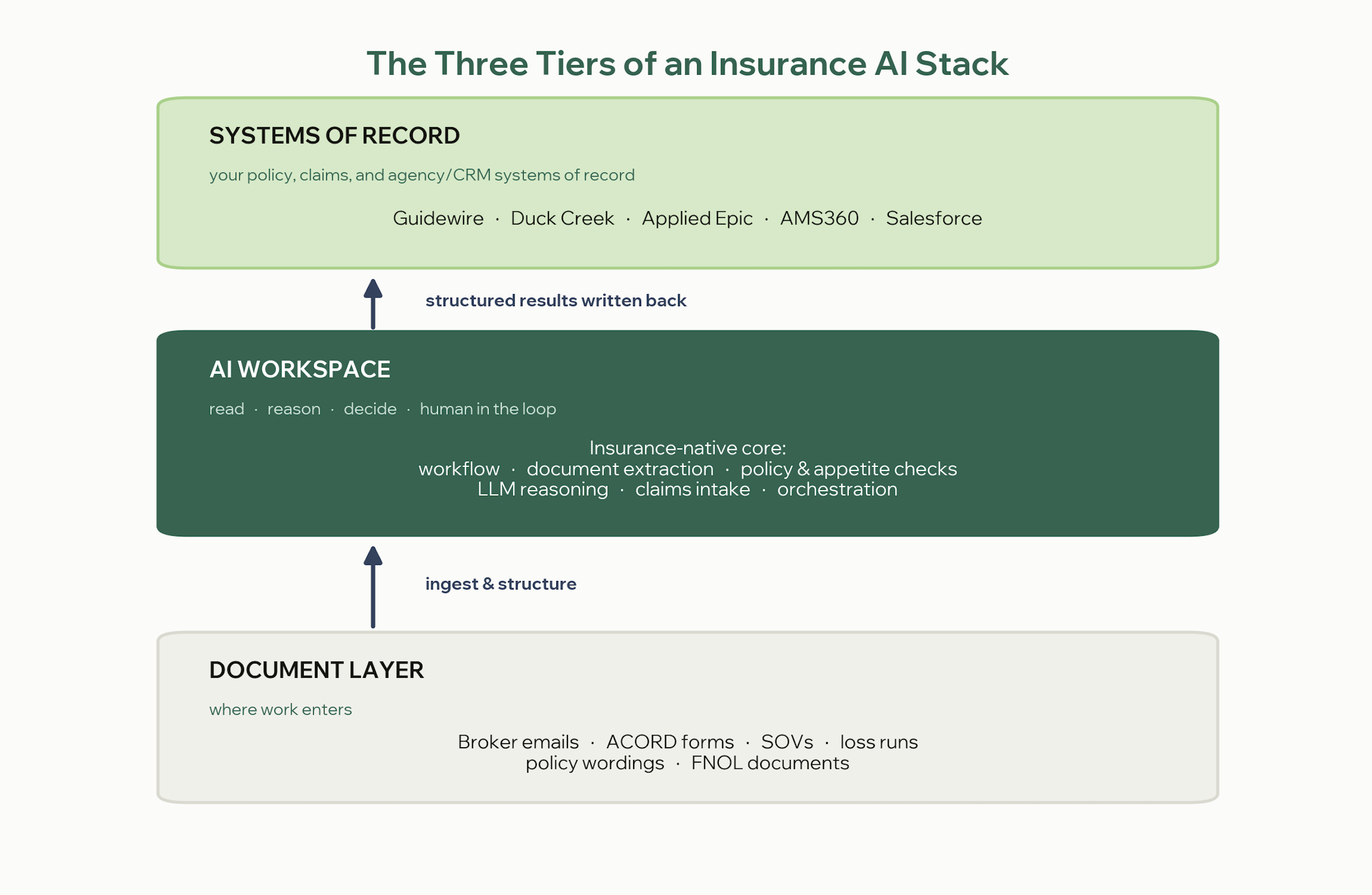
The more of the middle tier a single insurance-native platform covers, the less integration work you inherit — but no platform is your system of record, so how the workspace connects to and writes back into your core is the part that makes or breaks the stack. The rest of this guide breaks the middle tier into its working layers, then covers integration and governance across all three tiers. If you want a ranked comparison of the core platforms themselves, that lives in our guide to the best AI platforms for insurance companies.
The layers inside the AI workspace tier
The table maps the working layers of the middle tier, the tools that lead each one, and whether an insurance-native platform like FurtherAI covers it natively. Vendor performance figures are self-reported unless otherwise cited.
Below, each layer uses the same structure so you can compare like for like.
Layer 1: Insurance-native workflow core
- What it does: runs the actual underwriting and claims workflows — submission intake, SOV mapping, policy comparison, underwriting audit, and claims intake — with audit trails and human review built in.
- Leading tools: FurtherAI, the AI workspace purpose-built for commercial insurance. It supports customers writing more than $15 billion in premium and is used by insurers including Accelerant, MSI, and Leavitt Group.
- Best for: carriers, MGAs, wholesalers, and brokers that want one insurance-native layer across the submission-to-bind and claims lifecycle instead of a dozen point tools.
- Watch-out: it's built for commercial and specialty lines, so very small agencies or personal-lines direct-to-consumer teams may not be the target fit, and deep legacy-core integration still takes implementation work.
"After evaluating several vendors, we chose FurtherAI for its performance, insurance expertise, and partnership approach. The forward deployed engineer model makes a big difference — they work directly with our teams and help us get results quickly." — Doug Alexander, VP of Digital Delivery, Upland Capital Group
Layer 2: Document extraction
- What it does: converts unstructured documents — ACORD forms, statements of value, loss runs, policy wordings — into structured, machine-readable data.
- Leading tools: Azure AI Document Intelligence and Google Document AI for general extraction. An insurance-native core handles this layer with insurance-specific understanding of ACORD and SOV structures, so many teams don't need a separate extraction product.
- Best for: teams with high volumes of varied or handwritten documents that generic optical character recognition (OCR) can't reliably parse.
- Watch-out: horizontal extraction tools output data but don't act on it; you still need a workflow layer to turn extracted fields into quotes, proposals, or claim decisions.
Layer 3: General-purpose LLMs
- What it does: provides flexible reasoning for drafting coverage letters, summarizing long policy documents, and turning messy FNOL notes into structured detail.
- Leading tools: ChatGPT Enterprise, Anthropic's Claude, Google Gemini, and Microsoft Copilot. Some teams run more than one frontier model to compare outputs or route sensitive work to the strongest data-handling option.
- Best for: individual underwriters and adjusters handling ad hoc tasks, and product teams prototyping on top of frontier models.
- Watch-out: these models have no native understanding of insurance documents, no audit trail, and no core-system integration, so anything near a bind or claim decision needs guardrails and human review.
Layer 4: Workflow orchestration
- What it does: connects the SaaS tools an insurance team uses daily — email, customer relationship management (CRM), rating engines, and e-signature — and moves data between them.
- Leading tools: Make (visual, friendly to non-technical ops teams), n8n (developer-oriented and self-hostable), and Zapier (the broadest no-code connector catalog).
- Best for: operations teams that need to wire the stack together quickly without standing up an engineering project.
- Watch-out: none of these understand ACORD forms or SOVs, and usage-based pricing can climb fast at high volume; governance and audit logging are thinner than regulated environments usually require.
Layer 5: Robotic process automation
- What it does: automates repetitive, rule-based work in legacy core systems, such as keying data, reconciling records, and moving files between applications.
- Leading tools: UiPath, the enterprise RPA standard, now adding an agentic layer that pairs bots with AI agents. UiPath reports that roughly 40% of underwriting work is administrative.
- Best for: large carriers and service centers automating legacy core systems without replacing them.
- Watch-out: classic bots are brittle and break when a source screen or document format changes, implementation is consulting-heavy, and pricing is out of reach for most small MGAs.
Layer 6: Customer service and FNOL agents
- What it does: resolves routine policyholder and first-notice-of-loss questions — claim status, billing, certificate requests — at the top of the funnel.
- Leading tools: Intercom Fin, one of the most deployed no-code service agents; Intercom reports it resolves an average of 76% of queries. Gartner expects agentic AI to autonomously resolve 80% of common customer-service issues by 2029.
- Best for: customer service, policyholder support, and FNOL teams that want a production-grade agent with little engineering lift.
- Watch-out: service agents aren't built for coverage analysis, reserve-setting, or underwriting judgment, and resolution quality depends heavily on the knowledge base behind them.
Layer 7: Business intelligence and reporting
- What it does: turns policy, claims, and premium data into dashboards for loss-ratio monitoring, underwriting performance, fraud signals, and portfolio risk. This layer matters: US insurance fraud costs at least $308.6 billion a year, and fraud-signal reporting is one way teams catch it.
- Leading tools: Power BI (cheaper, tight Microsoft integration) and Tableau (more sophisticated visualization).
- Best for: analytics, actuarial, and finance teams that need shareable reporting on top of underwriting and claims data.
- Watch-out: BI tools surface insights but don't act on them, and both need a well-designed data warehouse and reliable pipelines underneath.
The build-your-own option: agent frameworks
- What it does: lets engineering teams build custom AI agents from scratch — a submission-triage agent, a claims fraud-signal agent, or a treaty summarizer.
- Leading tools: LangChain, with LangGraph for orchestration and LangSmith for observability.
- Best for: teams with strong engineering resources that need something proprietary and deeply integrated with internal systems.
- Watch-out: everything from prompts to production monitoring stays on your team, build times run into months, and without insurance domain expertise it's easy to end up with a prototype that never ships. We cover this trade-off in our build versus buy guide.
How the layers work together
The value shows up when the layers connect across the three tiers. A claims example: an FNOL arrives by email (document layer), the service agent captures the basics, the extraction and workflow core structure the documents and route the claim (AI workspace), an LLM drafts the acknowledgment, and the result is written back into the legacy claims system (core), while BI tracks cycle time and reserves. See our AI claims intake framework and FNOL automation guide for that flow in depth.
An underwriting example runs the same way: a broker submission lands (document layer), the core extracts and standardizes the SOV and ACORD data, runs appetite and policy checks, and produces a proposal (AI workspace), while orchestration syncs the CRM and writes the cleared submission into the policy system (core). For a tools-only view of that side, see our AI tools for commercial underwriting.
Integration and write-back: connecting the workspace to your core
This is the tier most stacks underestimate. An AI workspace only creates value if the structured data it produces lands back in your systems of record — cleanly, with an audit trail, and without a human rekeying it. Modern insurance-native platforms connect through prebuilt connectors and APIs; where a core system has no API, an iPaaS layer (Make, n8n) or RPA (UiPath) bridges the gap. FurtherAI, for example, integrates with more than 100 enterprise systems including Applied Epic, Salesforce, AMS360, and Guidewire, and packages these as Connectors so one workspace can read from and write to the systems around it. A useful companion when you're assessing this fit is our guide to evaluating AI workspaces for policy administration, since your policy admin system (PAS) stays the system of record while the workspace moves data in and out.
Integration checklist
Work through this before you commit to a stack:
- Inventory your systems of record. List every PAS, claims system, AMS/CRM, rating engine, and document store the stack must touch — and whether each exposes an API.
- Decide read vs. write-back per system. Be explicit about what the workspace reads (e.g., pulls a submission) versus what it writes back (e.g., a cleared submission, a claim record, an extracted SOV).
- Choose the connection method per system. Native connector first; API second; iPaaS (Make, n8n) for the long tail; RPA only where a legacy screen has no API.
- Map fields to your schemas. Align extracted fields to your ACORD and SOV structures and to the target system's fields, including code/lookup values, so nothing lands mismatched.
- Set human-in-the-loop checkpoints. Require underwriter or adjuster approval before any write that affects a bind, quote, reserve, or claim decision.
- Log every write. Capture data lineage and an audit trail on each write-back — who/what wrote it, from which source, and when.
- Plan error handling and reconciliation. Define what happens on a failed or partial write, and how records get reconciled back to the source of truth.
- Confirm security and data controls. SSO and role-based permissions, encryption, data-residency and retention rules, and a no-model-training guarantee on your data.
- Phase the rollout. Start with one workflow or line of business, prove the round-trip end to end, then expand — rather than integrating everything at once.
How much of the stack can one platform cover?
The fewer separate tools you integrate, the faster you get value and the less you spend maintaining glue code. An insurance-native core consolidates the workflow, extraction, and policy-checking layers, and reaches into the LLM and claims-intake layers, so most teams only add orchestration, RPA, or BI where they already have investments. That's an architecture decision about your integration surface — not a verdict on which brand is "best," which belongs in the platform comparison.
The results come from that consolidation. FurtherAI customers report submission clearance dropping from about 32 minutes to about one minute at roughly 99% accuracy, underwriting audit time falling about 45% (from roughly 200 hours to 110 hours per MGA), 400% ROI on policy checking with up to a 95% reduction in manual review, 646% ROI on complex property SOV intake, and 90%+ automation of claims intake.
Governance across the whole stack
Every layer that touches an underwriting or claims decision needs to be explainable and auditable. Align the stack with the NIST AI Risk Management Framework and the NAIC Model Bulletin on the use of AI systems by insurers, which expects a written AI systems program and compliance with existing law when AI affects consumers. The cleanest way to keep governance intact is to minimize the number of tools handling regulated decisions and to favor layers that capture every output as structured, citable data. Our guide to AI governance in insurance covers this end to end.
Key takeaways
- An insurance AI stack has three tiers — the document layer, an AI workspace, and your core systems — connected by integration and write-back.
- The AI workspace tier breaks into layers: a workflow core, document extraction, general-purpose LLMs, orchestration, robotic process automation (RPA), customer-service/FNOL agents, and business intelligence (BI).
- You rarely need every layer as a separate product. An insurance-native core consolidates the workflow, extraction, and policy-checking layers, so you bolt on fewer point tools and maintain less glue code.
- Integration is the real project. Decide read-vs-write-back per system, map fields to your ACORD/SOV schemas, and keep a human in the loop before anything writes to a bind or claim.
- Insurers expect more than 20% cost savings from AI over the next two years, per EY — but only if governance and integration are built in from the start.
REFERENCES
Coalition Against Insurance Fraud. "The Impact of Insurance Fraud on the U.S. Economy." insurancefraud.org. insurancefraud.org
EY. "Gen AI in Insurance: Key Survey Findings." ey.com. ey.com
FurtherAI. "Connectors: One Workspace, Every Insurance System." furtherai.com. furtherai.com
FurtherAI. "Customers." furtherai.com. furtherai.com
FurtherAI. "Product." furtherai.com. furtherai.com
Gartner. "Gartner Predicts Agentic AI Will Autonomously Resolve 80% of Common Customer Service Issues Without Human Intervention by 2029." gartner.com. gartner.com
Intercom. "Fin — The #1 AI Agent for Customer Service." intercom.com. intercom.com
National Association of Insurance Commissioners. "NAIC Members Approve Model Bulletin on Use of AI by Insurers." naic.org. naic.org
National Institute of Standards and Technology. "AI Risk Management Framework." nist.gov. nist.gov
UiPath. "Insurance Automation." uipath.com. uipath.com
DISCLAIMER
This article is for general informational purposes only and does not constitute legal, regulatory, compliance, underwriting, or other professional advice. The content reflects information available as of the date of publication, and FurtherAI undertakes no obligation to update it as laws, regulations, or AI technologies evolve.
Recent posts
.png)
Ready to go further and
transform your insurance ops?
Reclaim your time for strategic work and let our AI Assistant handle the busywork. Schedule a demo to see how you can achieve more, faster.




.svg)